AI agents platform for companies: the architecture design
I am designing a platform that connects Excel, databases, APIs and documents, and answers in natural language saying where each figure comes from. It is in construction, in phase 0: this page describes the design.
What it is and its status
The AI agents platform for companies is in construction, in phase 0: architecture. There is no code published yet. This page describes the design I defined, not a product you can use today.
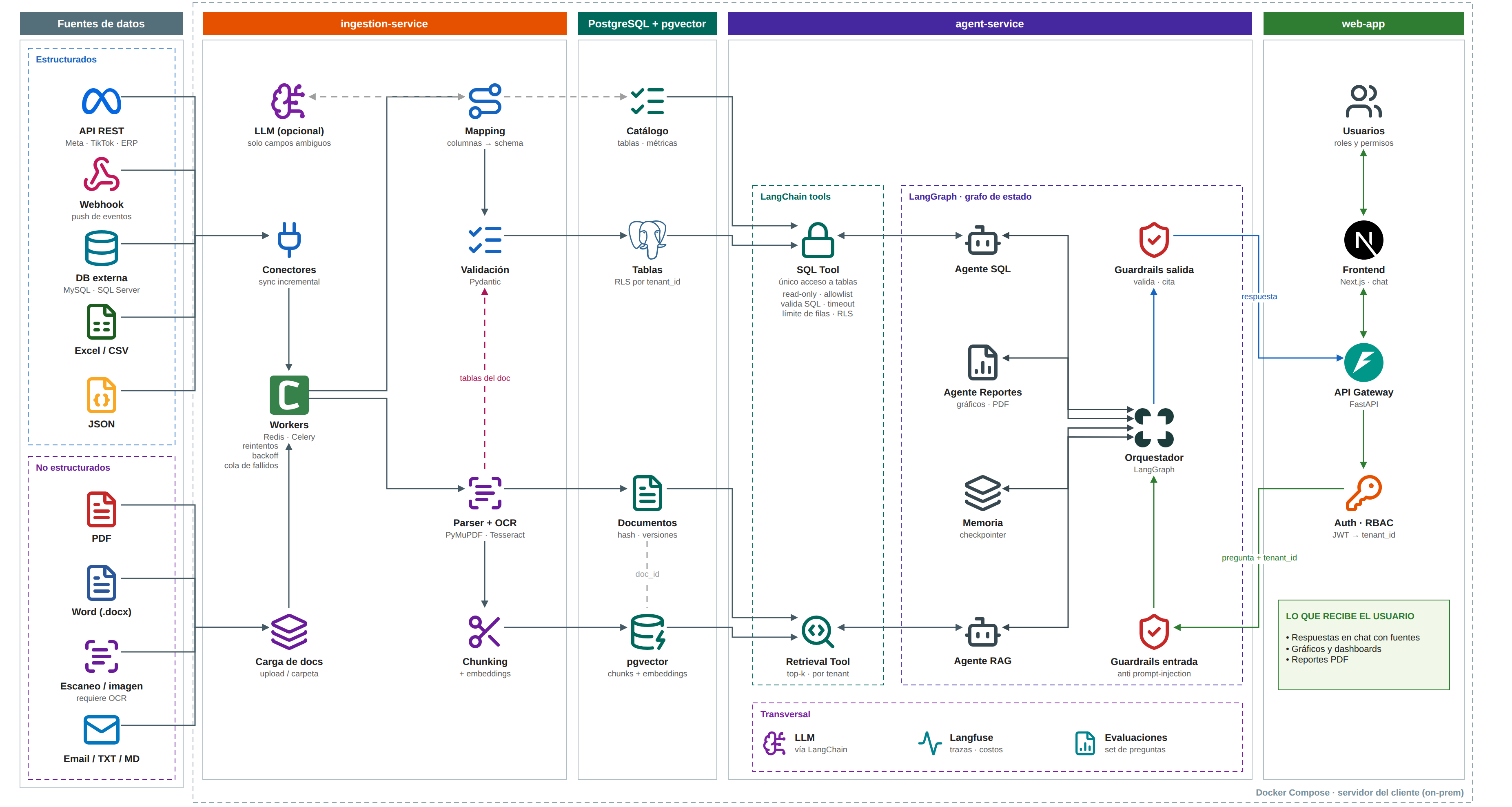
The design is documented with a C4 model, a sequence diagram and 10 ADRs. The full architecture diagram can be opened at full size below.
The problem it solves
A company’s information is spread across Excel sheets, databases, APIs and documents. The platform aims to connect those sources and answer questions in natural language, stating in each answer where each figure comes from.
What the person receives in the chat is answers with their sources, charts and dashboards, and PDF reports.
Architecture
There are four pieces: an ingestion service, a PostgreSQL database with pgvector, an agent service and a web application. The cross-cutting layer adds the LLM through LangChain, traces and costs with Langfuse, and evaluations over a question set.
- Planned stack: Python, LangGraph, LangChain, FastAPI, PostgreSQL with pgvector, Langfuse, Next.js and Docker.
- Planned deployment: Docker Compose on the client’s own server (on-prem).
- Web application: a Next.js chat frontend, a FastAPI API gateway, auth and RBAC with a JWT that carries the tenant_id, and users with roles and permissions.
Data sources and ingestion
The structured sources are REST APIs, webhooks, external databases (MySQL and SQL Server), Excel and CSV, and JSON. The unstructured ones are PDF, Word, scans and images that need OCR, and email, TXT and MD.
- Connectors with incremental sync.
- Workers on Redis and Celery, with retries, backoff and a failed-job queue.
- Mapping from columns to the schema, using an optional LLM only for ambiguous fields.
- Validation with Pydantic.
- Parser and OCR with PyMuPDF and Tesseract, followed by chunking and embeddings.
- Document upload.
The AI part: the agent service
The agent service exposes two LangChain tools. The SQL Tool is the only access to the tables. The Retrieval Tool fetches the top-k chunks, always within a tenant.
On top of them there is a LangGraph state graph: an orchestrator routes each question to the SQL agent, the reports agent (charts and PDF) or the RAG agent. Memory uses a checkpointer.
Planned reliability and security
- The SQL Tool is read-only: allowlist, validated SQL, timeout, row limit and RLS.
- Tables carry RLS per tenant_id, and the Retrieval Tool also retrieves per tenant.
- An input guardrail against prompt injection and an output guardrail that validates and cites.
- Documents are stored with a hash and versions.
- Langfuse records traces and costs, and the system is evaluated over a question set.
What is defined and what is not
- Defined: the architecture, documented with a C4 model, a sequence diagram and 10 ADRs.
- Does not exist yet: the code. There is no public repository, no demo and no metrics, because there is nothing to measure.
- Everything above is design. When a first working version exists, this page will be updated with what has been measured.
Stack
- Python
- LangGraph
- LangChain
- FastAPI
- PostgreSQL + pgvector
- Langfuse
- Next.js
- Docker